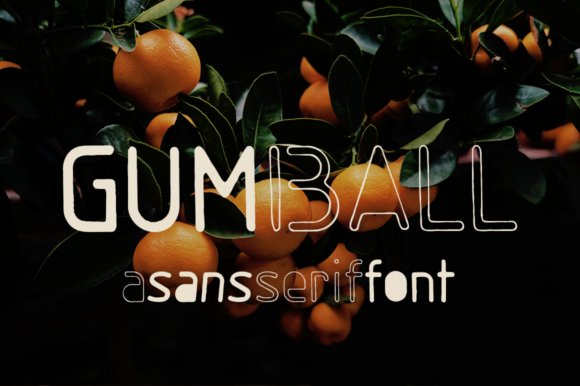
Gumball Font Review
As a web designer, I often look for fonts that bring personality and visual interest to a site without sacrificing clarity. Gumball, a hand-drawn sans serif font, caught my eye for its playful yet professional vibe. It’s the kind of typeface that feels like it was drawn with a ruler and a bit of love, making it perfect for digital projects that need a human touch.
Testing Gumball in a Hero Section
I started by testing Gumball in a hero section for a boutique online store. The font’s subtle texture adds warmth without overwhelming the design. It pairs well with bold colors and clean backgrounds, making it ideal for headlines that need to stand out. On desktop, the font looks crisp and modern, while on mobile, it remains legible and engaging.
The handmade quality of Gumball gives it a unique edge. It doesn’t feel mass-produced, which is great for brands that want to convey authenticity. Whether it's a product name, a tagline, or a call-to-action, Gumball adds character without being too distracting.
Using Gumball in Call-to-Action Buttons
I experimented with Gumball in CTA buttons for a course sales page. The font’s slightly irregular edges give it a friendly, approachable feel—perfect for encouraging clicks. When paired with a simple sans serif for the button background, it creates a balanced contrast that draws attention without cluttering the layout.
On smaller screens, Gumball holds up well. The letters are distinct enough to be readable even at smaller sizes. This makes it a good choice for buttons that need to be both visually appealing and easy to tap.
Pairing Gumball with a Clean Body Font
One of the biggest challenges with display fonts is ensuring they don’t clash with body text. I found that pairing Gumball with a clean, modern sans serif like Open Sans or Lato works exceptionally well. The contrast between the two fonts creates a clear visual hierarchy, making the headline pop while keeping the rest of the content easy to read.
This combination is especially useful for landing pages where you need to guide the user through a message. Gumball can highlight key points, while the body font ensures the details remain accessible.
Responsive Design Considerations
When designing for multiple screen sizes, it’s important to test how Gumball looks on different devices. On larger monitors, the font’s texture and shape are more visible, adding depth to the design. On smaller screens, it maintains its readability, though the texture becomes less pronounced.
For dark backgrounds, Gumball still performs well, as long as there’s sufficient contrast. On light backgrounds, it can sometimes feel a bit too soft, so adjusting the weight or using a bolder variant might help. Always test the font in your specific color scheme to ensure it meets your design goals.
Best Uses for Gumball in Web Design
Gumball shines in areas where visual impact matters most. It’s excellent for headers, subheadings, and decorative elements. I’ve used it in blog graphics, portfolio titles, and promotional banners, and each time it brings a sense of creativity and craftsmanship.
It’s also a great fit for brand identity projects, especially for businesses that want to feel more personal. Whether it's a creative studio, an artisan shop, or a digital product launch, Gumball adds a touch of individuality that other fonts might lack.
However, it’s not the best choice for long paragraphs or dense text. If you’re planning to use Gumball for body copy, consider using it only for short phrases or highlights. For anything more extensive, a simpler font will keep the design clean and functional.
Font Pairing and File Formats
Before using Gumball on a website, check what styles and file formats are included. Most commercial fonts come with multiple weights and alternates, which can be useful for different design needs. I recommend using WOFF or WOFF2 formats for optimal performance across browsers.
If you're working on a client project, make sure the font license allows for web use. Some fonts restrict commercial applications, so always verify the terms before integrating them into a live site.
Overall, Gumball is a versatile display font that brings energy and charm to digital projects. Its handmade aesthetic makes it stand out, and its performance on different screen sizes and layouts shows it’s more than just a pretty face. Whether you're designing a portfolio, a landing page, or a brand identity, Gumball is a solid choice for adding personality to your web presence.